Deflector Shoot3.0
Publisher Description
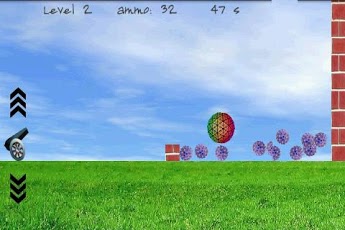
A physics-based game. The objective is to shoot projectiles over a wall to strike a target (purple balls) behind it within 60 seconds. You can control the trajectory as follows:* Set the angle of elevation using the up arrow and down arrow* Touch the cannon to shoot the projectileObjective:* Shoot all purple balls (small balls) within 60 seconds* To replenish cannons, shoot the multi-colored ball (large balls).* Also, each time you shoot the multi-colored balls, 15 seconds bonus is added to your playing time.Tips:* You may need to bounce the projectile off the right wall to hit the targets. * You can also cheat by tilting the phone/tablet left or right to move the balls.* Tilting affects the trajectory of the projectile as well. So you can have fun experimenting with gravity to make seemingly impossible hits.Provides hours and hours of engaging play. Enjoy and remember to rate this game if you like it!Installs on external SD card for Froyo. App2SD supported.
About Deflector Shoot
The company that develops Deflector Shoot is Android Games. The latest version released by its developer is 3.0. This app was rated by 1 users of our site and has an average rating of 4.0.
To install Deflector Shoot on your Android device, just click the green Continue To App button above to start the installation process. The app is listed on our website since 2012-10-04 and was downloaded 12 times. We have already checked if the download link is safe, however for your own protection we recommend that you scan the downloaded app with your antivirus. Your antivirus may detect the Deflector Shoot as malware as malware if the download link to com.blogspot.zandroidgame.deflectorshoot is broken.
How to install Deflector Shoot on your Android device:
- Click on the Continue To App button on our website. This will redirect you to Google Play.
- Once the Deflector Shoot is shown in the Google Play listing of your Android device, you can start its download and installation. Tap on the Install button located below the search bar and to the right of the app icon.
- A pop-up window with the permissions required by Deflector Shoot will be shown. Click on Accept to continue the process.
- Deflector Shoot will be downloaded onto your device, displaying a progress. Once the download completes, the installation will start and you'll get a notification after the installation is finished.
Program Details
System requirements
Download information
Pricing
Version History
version 3.0
posted on 2012-10-04
version 3.0
posted on 2012-10-04
Several fixes and updates
